GUI Agent数据标注与合成实操
OpenCUA方案
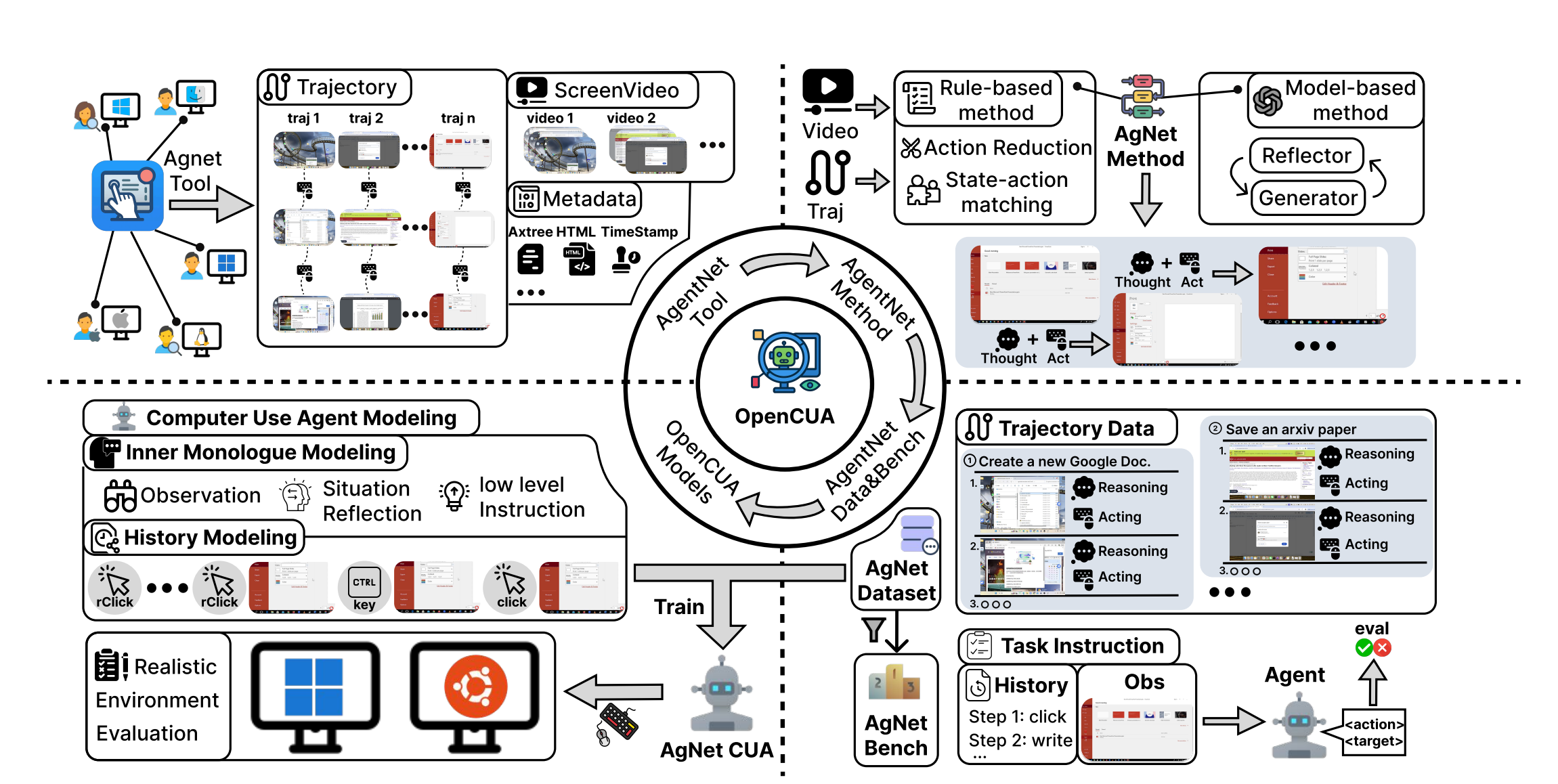
自研方案

1 人标注AgentNetTool – Annotation & Verification Tool (人标注,得到视频和点击的标注数据)
上图红色字体的操作,通过AgentNetTool 人标注能直接获得


2 直接录视频(无标注人力,只有操作的视频)
上图红色字体的操作,如果没有人力标注,就需要通过LLM来生成
动作场景生成

Video2Action: Reducing Human Interactions in Action Annotation of App Tutorial Videos
-
opencv https://github.com/Breakthrough/PySceneDetect
场景切割算法
detect-content顾名思义,这种方法就是根据前后图像的内容来进行判断,与我们常识中所说的视频转场是一样的。算法会根据前后2帧的视频数据,计算出它们不同的区域大小,如果这个区域大于某个预先设定的值(默认是30,可以通过
--threshold参数来指定),那么就认为场景已经切换了。detect-threshold这是比较传统的检测方法,有点像
ffmpeg中的blackframe滤镜。它会用特定的值去跟数据帧的亮度比较进行,如果大于某个预先设定的值,就认为场景已经切换了。在pyscenedetect中,这个值是由视频帧的每个像素的RGB的平均值计算而来。from scenedetect import detect, AdaptiveDetector, split_video_ffmpeg def f1(): src = r'C:\Users\m01216.METAX-TECH\Downloads\agentnet-annotator-win32-x64-0811\agentnet-annotator-win32-x64\resources\backend\_internal\Recordings\b3289d91-aac7-400c-b864-f53982bc3654\2025-08-20 13-56-53.mp4' detector = AdaptiveDetector() dst = r'C:\Users\m01216.METAX-TECH\Downloads\agentnet-annotator-win32-x64-0811\agentnet-annotator-win32-x64\resources\backend\_internal\Recordings\b3289d91-aac7-400c-b864-f53982bc3654\AdaptiveDetector' os.makedirs(dst, exist_ok=True) stats_file_path = os.path.join(dst, 'stats_file_path.txt') # os.makedirs(stats_file_path, exist_ok=True) scene_list = detect(src, detector, stats_file_path=stats_file_path, show_progress=True) print(scene_list) split_video_ffmpeg(src, scene_list, output_dir=dst) if __name__ == '__main__': # https://mp.weixin.qq.com/s/TavPYa-7vFtBxBQWdkowQA # scenedetect --input "C:\Users\m01216.METAX-TECH\Downloads\agentnet-annotator-win32-x64-0811\agentnet-annotator-win32-x64\resources\backend\_internal\Recordings\b3289d91-aac7-400c-b864-f53982bc3654\2025-08-20 13-56-53.mp4" --output "C:\Users\m01216.METAX-TECH\Downloads\agentnet-annotator-win32-x64-0811\agentnet-annotator-win32-x64\resources\backend\_internal\Recordings\b3289d91-aac7-400c-b864-f53982bc3654\AdaptiveDetector" --stats my_video.stats.csv detect-content list-scenes save-images # `detect-adaptive` or `detect-content` to find fast cuts, # and `detect-threshold` # scenedetect --input "C:\Users\m01216.METAX-TECH\Downloads\agentnet-annotator-win32-x64-0811\agentnet-annotator-win32-x64\resources\backend\_internal\Recordings\b3289d91-aac7-400c-b864-f53982bc3654\2025-08-20 13-56-53.mp4" --output "C:\Users\m01216.METAX-TECH\Downloads\agentnet-annotator-win32-x64-0811\agentnet-annotator-win32-x64\resources\backend\_internal\Recordings\b3289d91-aac7-400c-b864-f53982bc3654\detect_content" --stats my_video.stats.csv detect-content list-scenes save-images # scenedetect --input "C:\Users\m01216.METAX-TECH\Downloads\agentnet-annotator-win32-x64-0811\agentnet-annotator-win32-x64\resources\backend\_internal\Recordings\b3289d91-aac7-400c-b864-f53982bc3654\2025-08-20 13-56-53.mp4" --output "C:\Users\m01216.METAX-TECH\Downloads\agentnet-annotator-win32-x64-0811\agentnet-annotator-win32-x64\resources\backend\_internal\Recordings\b3289d91-aac7-400c-b864-f53982bc3654\detect_adaptive" --stats my_video.stats.csv detect-adaptive list-scenes save-images # scenedetect --input "C:\Users\m01216.METAX-TECH\Downloads\agentnet-annotator-win32-x64-0811\agentnet-annotator-win32-x64\resources\backend\_internal\Recordings\b3289d91-aac7-400c-b864-f53982bc3654\2025-08-20 13-56-53.mp4" --output "C:\Users\m01216.METAX-TECH\Downloads\agentnet-annotator-win32-x64-0811\agentnet-annotator-win32-x64\resources\backend\_internal\Recordings\b3289d91-aac7-400c-b864-f53982bc3654\detect_threshold" --stats my_video.stats.csv detect-threshold list-scenes save-images f1() -
CV模型预测,未开源,需要再找
action prediction 动作位置预测

https://openreview.net/pdf?id=PcwaP4o7vk

3 DataProcessor – Action Reduction & State–Action Matching(聚类,减少动作状态,过滤一些无含义的动作,得到action 文本)
https://github.com/xlang-ai/OpenCUA/tree/main/data/data-process

4 CoTGenerator – Synthesizing Reflective Long Chain-of-Thought Inner Monologue(生成aciton对应的COT,得到 thought 文本)
https://github.com/xlang-ai/OpenCUA/tree/main/data/cot-generate

5 AgentNet 训练数据具备
https://huggingface.co/datasets/xlangai/AgentNet
6 训练代码
未开源,qwen的基座模型
7 inference代码
https://github.com/xlang-ai/OpenCUA/tree/main/model/inference
8 部署商用工具与代码
使用字节的UI-TARS-desktop
https://github.com/bytedance/UI-TARS-desktop/blob/main/README.zh-CN.md
9 评测
https://mp.weixin.qq.com/s/1smJ0pgptP2UPhT4Fx970Q: https://mp.weixin.qq.com/s/1smJ0pgptP2UPhT4Fx970Q
参考资料
https://agentnet-tool.xlang.ai/requirements/annotation/annotation/
Annotation Pipeline Overview
Annotation Pipeline contains 5 steps:
-
Step 1: Open OBS and login AgentNet
-
Step 2: Record a task using AgentNet tool
-
Step 3: Review the recorded task
-
Step 4: Write task description
-
Step 5: Upload the task
https://opencua.xlang.ai/: https://opencua.xlang.ai/
https://mp.weixin.qq.com/s/DrVO8xp3z-OWIESP7q-Vjg: https://mp.weixin.qq.com/s/DrVO8xp3z-OWIESP7q-Vjg
https://arxiv.org/pdf/2508.09123: https://arxiv.org/pdf/2508.09123
https://mp.weixin.qq.com/s/DGwJjOPTyBxlsYBpeqLcqw: https://mp.weixin.qq.com/s/DGwJjOPTyBxlsYBpeqLcqw
